txtop
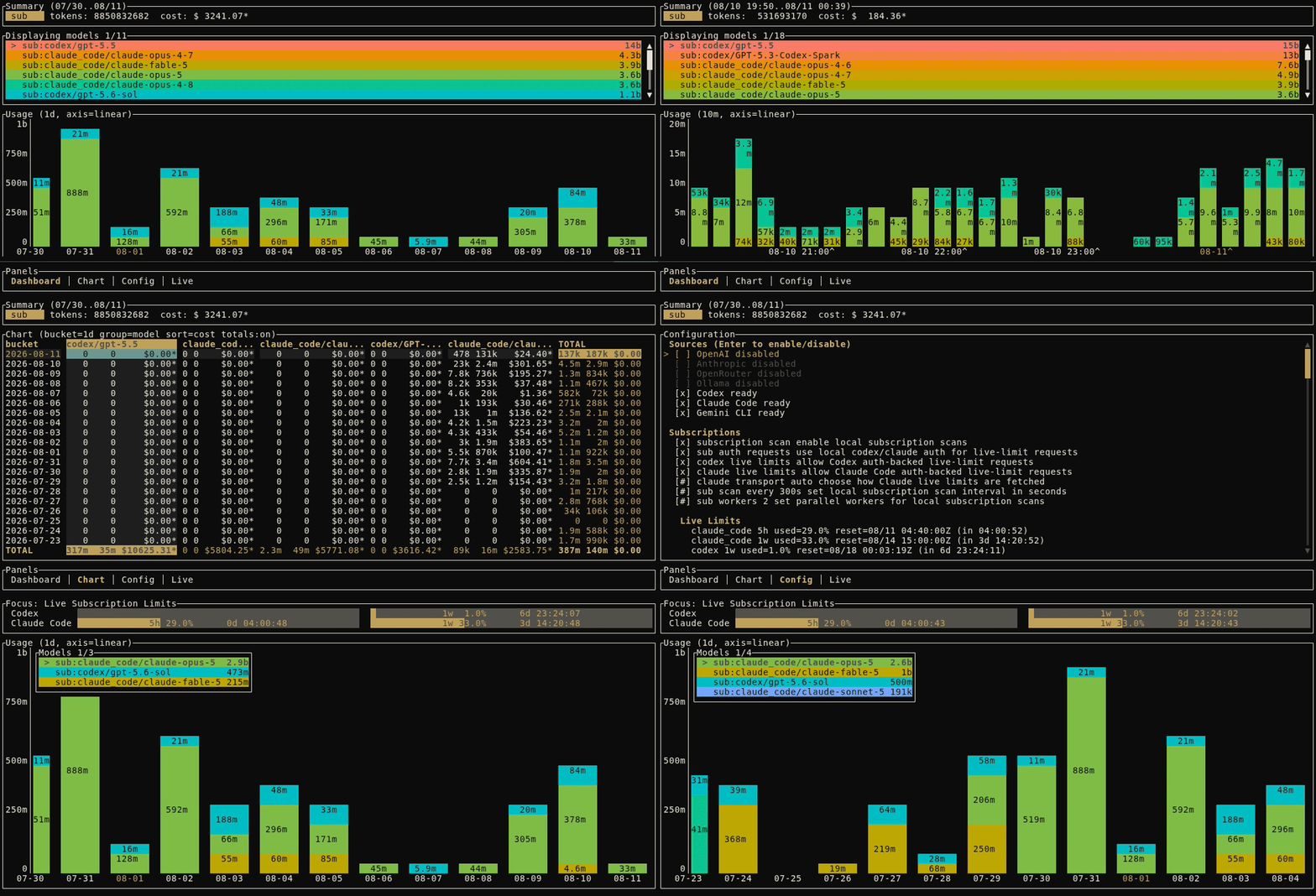
txtop is a terminal dashboard for LLM usage, cost, and limits across providers.
It is built as a daily driver: keyboard-first, information-dense, and resilient when one source is down or slow.
Website · First run · Documentation · Changelog
Install
With Rust 1.88 or newer:
cargo install txtop --locked
txtop
Prebuilt archives for Linux, macOS, and Windows on x86-64 and ARM64 are
available from GitHub Releases. Linux
archives are static musl builds for broad distribution compatibility. Each
release includes SHA-256 checksums. Extract the archive and place txtop (or
txtop.exe) somewhere on your PATH.
To build the current source instead:
git clone https://github.com/y4le/txtop.git
cd txtop
cargo install --path . --locked
Opening txtop automatically keeps the collector running while at least one
TUI is open, using that TUI’s effective config and CLI options. An existing
collector is reused and left alone. Use txtop up (or `txtop up –config
`) to promote an automatically started collector to a persistent
background service, and `txtop down` to stop it.
Providers auto-enable when their configured credential environment variables are present. Press `?` for the current keymap; open the Config panel for settings.
For a guided setup that needs no API key, follow
[see your first usage data](docs/first-run.html).
## Data sources
### Provider APIs
txtop polls usage and billing APIs. Provider failures stay scoped to that provider; the rest of the dashboard keeps working.
| Provider | Credential | Usage granularity | Cost |
|---|---|---:|---|
| OpenAI | `OPENAI_ADMIN_KEY` usually required | minute | reported |
| Anthropic | `ANTHROPIC_ADMIN_KEY` usually required | minute | reported |
| OpenRouter | `OPENROUTER_API_KEY` | day | reported |
API providers may require organization or administrator credentials to read
usage and cost data. See [connect a provider API](docs/providers.html) for setup
and [configuration](docs/configuration.html) for overrides and backfill.
### Coding subscriptions
txtop can scan local logs from Claude Code, Codex, and Gemini CLI. Events join the same timeline as API usage.
```toml
[subscription]
enabled = true
codex_enabled = true
claude_code_enabled = true
gemini_cli_enabled = true
```
Live limits for Codex and Claude Code are optional. They use locally stored
credentials and undocumented provider behavior; they are disabled by default
and may break without notice. See [local coding-agent usage](docs/subscriptions.html),
[live subscription limits](docs/live-limits.html), and
[unofficial integrations](docs/fragility.html).
### Ollama
The experimental Ollama proxy records local token usage; optional model mappings add estimated costs. See [track Ollama usage](docs/ollama-proxy.html).
### OpenTelemetry
The experimental OTLP/HTTP collector accepts logs, traces, and metrics from Claude Code, Codex, Gemini CLI, OpenRouter, and custom clients. See [ingest OpenTelemetry](docs/otel.html).
## Use the dashboard
Switch between Dashboard, Chart, Config, and Live with `Tab` or `Shift-Tab`. Arrow keys and vim motions work throughout; the mouse also works.
The Live process tree uses Linux `/proc`; macOS and Windows show an explicit
unsupported message in that panel. All usage, chart, configuration, and
collector features remain available on those platforms.
| Key | Action |
|---|---|
| `?` | Show the full keymap |
| `j` / `k` | Move down / up |
| `h` / `l` | Pan or adjust |
| `g` / `G` | Jump to the first / last item |
| `w` / `b` | Jump to the next / previous data column |
| `m` | Cycle provider and model grouping |
| `t` / `T` | Use a larger / smaller time bucket |
| `f` | Toggle the focused dashboard |
| `r` | Refresh now |
| `1` / `2` / `3` | Toggle API / subscription / local series |
| `q` | Quit |
The Config panel persists changes to `config.toml`. Press `D` for diagnostics; press `y` to write a debug summary.
## Configuration
The config and data files live under the operating system's standard per-user
directories. On Linux the defaults are `~/.config/txtop/config.toml` and
`~/.local/share/txtop/usage.db`; macOS and Windows use their normal Application
Support/AppData locations. Start with [the commented example](/txtop/examples/config.toml);
see the [configuration reference](docs/configuration.html) for exact paths and all
fields.
Precedence is highest to lowest:
1. CLI flags
2. `TXTOP_*` environment variables
3. Config file
4. Built-in defaults
## Data and privacy
txtop stores its database locally. Enabled API providers and live-limit checks make outbound requests; subscription log scanning only reads local files.
Live-limit checks reuse credentials stored by Codex or Claude Code. This relies
on undocumented behavior; it may break without notice and may violate provider
terms of service. Enable it only after reviewing
[unofficial integrations](docs/fragility.html).
Prefer environment variables over credentials in `config.toml`. Review debug bundles before sharing them; redaction is best effort.
## Docs
- [See your first usage data](docs/first-run.html); install, scan local history,
and learn the dashboard.
- [Documentation map](docs/README.html); choose a task, reference, or explanation.
- [Configuration reference](docs/configuration.html); look up paths, fields,
defaults, and precedence.
- [Where the numbers come from](docs/data-sources.html); understand data lanes,
deduplication, and billing differences.
- [Troubleshooting](docs/troubleshooting.html); inspect source, collector, and
database health.
- [Compatibility and support](docs/compatibility.html); check the stable 1.x
contract and experimental surfaces.
## Development
```bash
cargo test
scripts/check_all.sh
scripts/check_release.sh
```
The full workflow requires `shellcheck`, `jq`, and `cargo-deny`. See the
[contributor guide](https://github.com/y4le/txtop/blob/master/CONTRIBUTING.md)
for architecture, performance, tests, and provider extensions.
Preview the landing page and rendered public docs without pushing:
```bash
scripts/site_dev.sh # http://127.0.0.1:4174/
scripts/site_tailnet.sh # https://.ts.net/txtop/
```
Both scripts build the same staged Jekyll source used by Pages. The tailnet build keeps the production `/txtop/` base path while its upstream server stays at `/`, matching Tailscale Serve's path-prefix handling. Set `TXTOP_SITE_PORT` to change the local port; the tailnet script owns only `/txtop/` and removes that route when it exits.
## Inspirations / alternatives
- [`toktop`](https://github.com/htin1/toktop)
- txtop started as a potential pull request for toktop before it grew in scope. You can still see the influence in the 1d rollups.
- You may prefer it for a simpler terminal usage monitor with a different opinionated interface.
- [`cclimits`](https://github.com/cruzanstx/cclimits)
- txtop learned how to fetch live subscription limits from this project.
- You may prefer it for a focused, lightweight limit checker or statusline tool.
- [`ccusage`](https://github.com/ryoppippi/ccusage)
- txtop learned how to parse local subscription logs from this project.
- You may prefer it for CLI reports from local coding-agent logs.